I need to come up with a way to mark selectable objects to the player.
But whoa, there. Isn't there a huge time gap between this post and the last one?
Yeah, there is. I've lost my motivation to work on the game. I needed to create a system for cutscenes, I needed to fix little bugs and implement tiny changes, etc. And somewhere in those, I just didn't enjoy working on the game.
So what happened? Well, a couple of things, which I don't want to explain, just the key things: I played Inside. And that gave me some ideas. Like, scrap a lot of things from the design. Cutscenes, storytelling, things like that - you know, things that would make a game understandable, that would make the game tell a concrete story. So instead I'm opting for a way to just convey a mood, and let the players come up with explanations. There was a story and a message to the game. There still is. But now I try to say as little as possible, and choose other ways of passing on this message. We'll see how it will turn out.
So, with that, a lot of those tiny things are basically taken care of. And I no longer feel working on this game a chore. In fact, it is the opposite: I'm eager to come up with the levels and puzzles and the various game modes I have in mind, to create the feel of the game I have planned.
And yeah... I need to come up with a way to mark selectables, because I don't like the current flashing system. Well, that is all that I wanted to share right now. have fun, cy'all.

Thursday, June 8, 2017

Wednesday, November 16, 2016
Corner cases
So now that I have a coherent vision of the game, I finished the first level (which will be a tutorial level really, nothing much is going on). Interesting fact: I made this based on the house of another, childhood friend of mine, with slight modifications. I don't know why, but that house is the default one when I try to imagine what other houses look like. Perhaps this friend represented to me what a 'normal' family would look like? This seems the most reasonable explanation, but then again, I have no way of being sure. I'll stick with it, though.
So after I have added the last few little touches (texts on the walls, that hint at the general aura of the whole game; also added the music for this level. I have all the songs I want to use, downloaded from incompetech - royalty-free music ftw!), I've asked a friend to look at it, while I could watch him play (Teamviewer 11 gives a very good user experience, if you have a good enough network connection, I can only recommend!), and I made a few notes. Afterwards, I asked for his input, and then talked about it.
So, as it turned out, I need to rework the shades, or somehow I need to make it more clear to the player that he needs to avoid them. Or that they hurt the player. Or that the blur effect is supposed to mark how afraid the character is. Or that darkness is to be avoided. He had the idea that there could be little words flash in and out (not too visibly) in the dark areas (words like "fear", "loneliness" and stuff). But then, why not make the shades become these floating words, instead? I think I'll go with that idea.
Another problem was that at the starting room, one could easily "die" by accidentally going backwards, into the shadow. He suggested to remove the nightstand from next to the bed, and instead put a shelf in the opposite corner, which could provide a clear hint at the player that shadows are bad.
But this problem also presented itself at the end of the level, where there is a bed, and if you go too close to it, you enter the shadowy part, which means death. Since I check the player's center point against the lights, and not the whole model, this gives unrealistic results in these corner cases. My friend suggested to use areas where this "feature" would not activate. Which seems like an easy thing to do, so I'll keep this suggestion in mind. (Another solution could be to sample not from one point, but from many. I'll need to explore these slutions sometime.)
And minor bugs, of course, because game development would be just plain boring if you wouldn't need to fix shit all the time.
So after I have added the last few little touches (texts on the walls, that hint at the general aura of the whole game; also added the music for this level. I have all the songs I want to use, downloaded from incompetech - royalty-free music ftw!), I've asked a friend to look at it, while I could watch him play (Teamviewer 11 gives a very good user experience, if you have a good enough network connection, I can only recommend!), and I made a few notes. Afterwards, I asked for his input, and then talked about it.
So, as it turned out, I need to rework the shades, or somehow I need to make it more clear to the player that he needs to avoid them. Or that they hurt the player. Or that the blur effect is supposed to mark how afraid the character is. Or that darkness is to be avoided. He had the idea that there could be little words flash in and out (not too visibly) in the dark areas (words like "fear", "loneliness" and stuff). But then, why not make the shades become these floating words, instead? I think I'll go with that idea.
Another problem was that at the starting room, one could easily "die" by accidentally going backwards, into the shadow. He suggested to remove the nightstand from next to the bed, and instead put a shelf in the opposite corner, which could provide a clear hint at the player that shadows are bad.
But this problem also presented itself at the end of the level, where there is a bed, and if you go too close to it, you enter the shadowy part, which means death. Since I check the player's center point against the lights, and not the whole model, this gives unrealistic results in these corner cases. My friend suggested to use areas where this "feature" would not activate. Which seems like an easy thing to do, so I'll keep this suggestion in mind. (Another solution could be to sample not from one point, but from many. I'll need to explore these slutions sometime.)
And minor bugs, of course, because game development would be just plain boring if you wouldn't need to fix shit all the time.
Sunday, November 13, 2016
Brain teaser
Early on the game, the player will enter in a level where there is a huge brain, with all kinds of devices attached to it. All these devices represent something, which I won't go into detail, because I want to spare some novelty for the actual game.
First thing to do is to get a brain model. I sure as hell won't start modelling one. So I need a free brain model, that is low-poly enough. Unfortunately I couldn't find one that I could use (tried to convert and whatnot, but for some reason I couldn't). That's when I ran into this. I downloaded the pial (in .obj), and then fired up Blender.

The number of faces is too large - it is in the realm of hundred thousands. Even if Unity would be able to handle this (it isn't, there is a hard cap at 65,536 faces), it would be too large for my game. What I did is to use the Decimate, Smooth and Triangulate modifiers. Decimate (planar, up to 20 degrees) did a good job at lowering the amount of faces, smooth made it look a bit better, and then triangulate fixed a problem in Unity, where some of the faces would not be rendered.


First thing to do is to get a brain model. I sure as hell won't start modelling one. So I need a free brain model, that is low-poly enough. Unfortunately I couldn't find one that I could use (tried to convert and whatnot, but for some reason I couldn't). That's when I ran into this. I downloaded the pial (in .obj), and then fired up Blender.

The number of faces is too large - it is in the realm of hundred thousands. Even if Unity would be able to handle this (it isn't, there is a hard cap at 65,536 faces), it would be too large for my game. What I did is to use the Decimate, Smooth and Triangulate modifiers. Decimate (planar, up to 20 degrees) did a good job at lowering the amount of faces, smooth made it look a bit better, and then triangulate fixed a problem in Unity, where some of the faces would not be rendered.

It contains about 10,000 faces. After that, I imported the model into a new scene, then I modeled a wire in blender, imported it as well, then added lights, materials, etc. This is the end result:

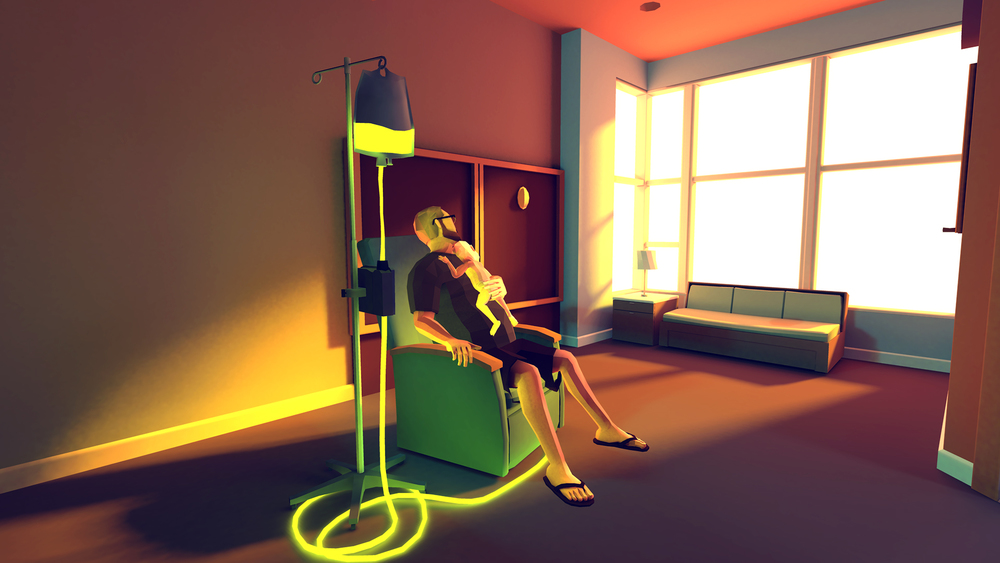
With the wires, I was aiming for a look like this (the game is called "That Dragon, Cancer"). However, this was just a quick mash-up to see the brain model in the game with a few effects, the end result will be a bit more polished, I hope.
Tuesday, November 8, 2016
Beginner's Guide
A few days ago I played a game called "Beginner's Guide", which is done by the same person as the game "The Stanley Parable". I don't say much about it other than it is also a story-driven game, that is all about getting to know a person by the kind of games they make (as seen in the trailer), because it would spoil a lot of good things. Check out the trailer here.
What I noticed while playing the game is that what the narrator, Dave, does, is also what I do naturally. I like to get to know people who somehow arouse my interest. And I mean *really* get to know them, to a very deep and personal level. I easily get obsessed about some.
But I'm also like Coda, the person who is the subject of all the analysis - although I have to admit that the basic ideas behind those games are far more creative, profound and symbolic than any of my game ideas. Heck, I even stopped working on this very game, because of lack of motivation, lack of ideas, I just couldn't come up with a way of continuing development. There wasn't an overarching theme, a topic, which I could use as a base when designing levels.
But after I played the Beginner's Guide, and got a few days to think about it, suddenly I was able to come up with a consistent idea, and finally I managed to create an ending (in my head) with which I am actually satisfied, unlike the previous one I had in mind.
So now that I know the desired end result, I can continue where I left. I also realized that in order for this game to be personal, artistic and meaningful, it doesn't even has to have very detailed models or such. I can do it in a minimalistic style, just like the Beginner's Guide.
I also changed the game's message. I intend it to be far more personal than I originally planned. I put out all my quirks and cracks, and hope for the best.
So for now, I feel the rush to work on this game again.
Hopefully, it will last longer than a few hours.
What I noticed while playing the game is that what the narrator, Dave, does, is also what I do naturally. I like to get to know people who somehow arouse my interest. And I mean *really* get to know them, to a very deep and personal level. I easily get obsessed about some.
But I'm also like Coda, the person who is the subject of all the analysis - although I have to admit that the basic ideas behind those games are far more creative, profound and symbolic than any of my game ideas. Heck, I even stopped working on this very game, because of lack of motivation, lack of ideas, I just couldn't come up with a way of continuing development. There wasn't an overarching theme, a topic, which I could use as a base when designing levels.
But after I played the Beginner's Guide, and got a few days to think about it, suddenly I was able to come up with a consistent idea, and finally I managed to create an ending (in my head) with which I am actually satisfied, unlike the previous one I had in mind.
So now that I know the desired end result, I can continue where I left. I also realized that in order for this game to be personal, artistic and meaningful, it doesn't even has to have very detailed models or such. I can do it in a minimalistic style, just like the Beginner's Guide.
I also changed the game's message. I intend it to be far more personal than I originally planned. I put out all my quirks and cracks, and hope for the best.
So for now, I feel the rush to work on this game again.
Hopefully, it will last longer than a few hours.
Saturday, April 9, 2016
Now you see me, now you don't!
EDIT: well, this solution isn't good enough. If you watch it from a different camera angle, the text is very visible, which I don't want. Searching for another solution. However, I'll leave it here, as maybe someone will come through the same problem I did (3D text showing through game objects).
EDIT2: All it took to fix it is just to create a new material for the floor, use the "Standard (Specular setup)" material, set "Specular" to black, and set "Albedo" to a light grayish value. Now it works from all angles.
Taking month-long breaks are my thing. Probably my weak willpower. Whatever.
Wanted to do a quick test of a way of including easter eggs. Let's assume I want to hide a piece of text in a room, and I want it to be revealed only if there is a different colored light is there. For example, I have a red text on a white floor, and the room is lit with red light. You won't see the text. But, if the room is lit by any other colored light (blue, green, white, etc..), then the text will be clearly visible.
However, there is a problem with the standard 3D text Unity grants. I'm not going into the details, but this blog post does. After fixing the shader, it works just as I imagined.
EDIT2: All it took to fix it is just to create a new material for the floor, use the "Standard (Specular setup)" material, set "Specular" to black, and set "Albedo" to a light grayish value. Now it works from all angles.
Taking month-long breaks are my thing. Probably my weak willpower. Whatever.
Wanted to do a quick test of a way of including easter eggs. Let's assume I want to hide a piece of text in a room, and I want it to be revealed only if there is a different colored light is there. For example, I have a red text on a white floor, and the room is lit with red light. You won't see the text. But, if the room is lit by any other colored light (blue, green, white, etc..), then the text will be clearly visible.
However, there is a problem with the standard 3D text Unity grants. I'm not going into the details, but this blog post does. After fixing the shader, it works just as I imagined.
Wednesday, February 17, 2016
Open, Sesame, again!
The last couple of days I was procrastinating busy learning Blender enough to be able to make a pop-up book animation. I plan to have such things for the menu, and for the "cutscenes".
What I did was just googling "blender pop-up book tutorial", found this video, and started to do something like it. There is really nothing more to it.
So far, I only made a test animation, so don't expect anything fancy. As I'm practicing it, my style will become more and more polished, and hopefully the end result in the final release will be fitting into the overall style of the game.
Obligatory gif in the post
What I did was just googling "blender pop-up book tutorial", found this video, and started to do something like it. There is really nothing more to it.
So far, I only made a test animation, so don't expect anything fancy. As I'm practicing it, my style will become more and more polished, and hopefully the end result in the final release will be fitting into the overall style of the game.
Obligatory gif in the post
Saturday, February 13, 2016
Everything is a blur
So I just added a blur filter, to let the player know where is the fear meter currently.
How to add blur effect to the camera in Unity 5 free version?
The way I did was pretty simple: clicked on Assets -> Import package -> Effects, selected BlurOptimized and PostEffectBase from Standard Assets/Effects/ImageEffects/Scripts, and selected MobileBlur from Standard Assets/Effects/ImageEffects/Shaders/_BloomAndFlares.
Then, added BlurOptimized to the camera as a component.
Now, since I don't want blurring just at the start of the game, I set the sliders to their minimal value. Then went into the Player component, and in the Update function, I added this code:
// Change main camera's blur to reflect fear level
Camera.main.GetComponent<UnityStandardAssets.ImageEffects.BlurOptimized>().blurSize = fearLevel * 10f;
(Gif in full post)
How to add blur effect to the camera in Unity 5 free version?
The way I did was pretty simple: clicked on Assets -> Import package -> Effects, selected BlurOptimized and PostEffectBase from Standard Assets/Effects/ImageEffects/Scripts, and selected MobileBlur from Standard Assets/Effects/ImageEffects/Shaders/_BloomAndFlares.
Then, added BlurOptimized to the camera as a component.
Now, since I don't want blurring just at the start of the game, I set the sliders to their minimal value. Then went into the Player component, and in the Update function, I added this code:
// Change main camera's blur to reflect fear level
Camera.main.GetComponent<UnityStandardAssets.ImageEffects.BlurOptimized>().blurSize = fearLevel * 10f;
(Gif in full post)
Subscribe to:
Posts (Atom)